What will the Patient Portal do?
We're introducing lots of capabilities for our Patient Portal, transforming how we interact with you and improving your Outpatient experience.
Digital letters and appointment reminders
You can view your Outpatient appointments and associated letters as soon as they’re scheduled in the Portal. You’ll be able to see all your appointment letters, in order of when they were sent (with the most recent at the top).
This will make it clearer about when you need to attend your appointments, whilst reducing the number of letters we need to print.
If you’re not able to use digital letters, or you don’t want to stop receiving paper letters, you needn’t do anything – they’ll continue to be sent in paper format as normal.
You might already be used to receiving appointment reminders via text from us – we've had this service set up in some of our services for a while. However, moving to a new messaging process means they're linked to the Patient Portal. This means you're able to view all your appointment details and associated letters in our Patient Portal.
If you need to talk to someone about an upcoming appointment, please call the number on your appointment letter.
NHS App
Think of the NHS App a bit like the front door to all Gloucestershire healthcare services; for us, our Portal is what’s behind it.
Learn more about the NHS App.
At the moment, the NHS App allows you to keep track of your vaccinations, order repeat prescriptions, manage GP appointments, get health information and advice, view your NHS Number and access your GP health record securely.
We’ve been working with our partners in the NHS App to allow you to share your letters, documents and questionnaires through not only the Patient Portal, but also the NHS App.
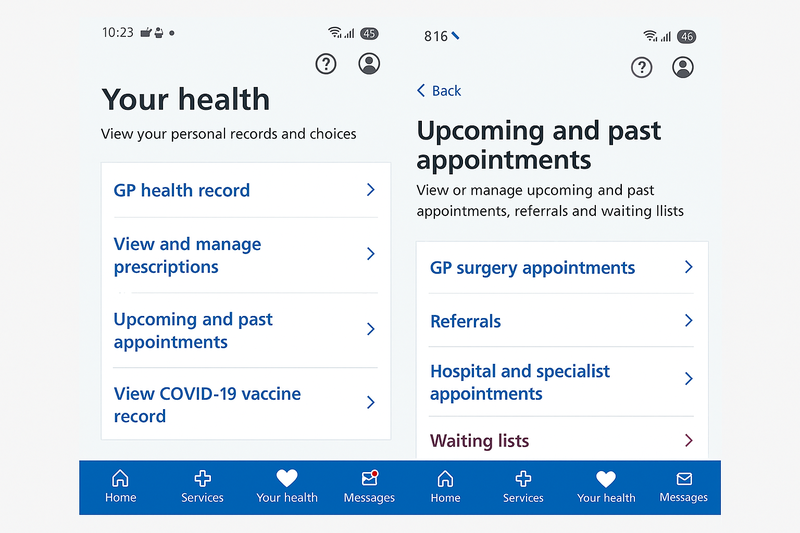
- You will receive notifications on your smartphone, of letters, documents or assessment being sent to the NHS App and from here be able to open these
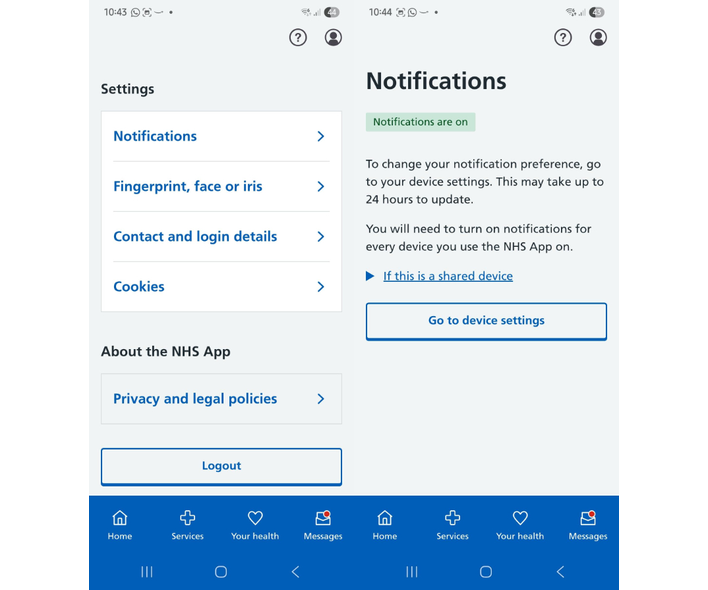
Setting preferences on receiving Notifications from the NHS App
- Please go to Settings and select Notifications
- From notifications, select the Go to device settings button to set your preferences
Appointment management
Our Patient Portal will enable you to reschedule an appointment, or submit a cancellation request if you no longer require it.
If you use the Portal, you won’t need to call the department, as you’ll receive confirmation of your new appointment or cancellation on your device.
By making cancellation and rescheduling easier for you, we can offer these short-notice appointments to other patients, allowing everyone the opportunity to be seen as quickly as possible.
Short questions about your care
We may sometimes send you a short question to help us manage your care, appointments or waiting lists. You’ll usually be asked to choose from a small number of responses, such as Yes, No or Unsure.
- Simple responses: You’ll receive a question that you can answer with a simple ‘Yes,’ ‘No,’ or ‘Unsure.’
- Who gets asked: Questions can be asked of any specific patient group. This is one question asked of the patient with 3 potential answers of Yes, No or Unsure.
Examples of questions we might ask:
- Are you able to attend your planned surgical procedure
- Do you still wish to remain on our waitlist
- Would you like to accept a short notice cancellation appointment
This tool is designed to make communication easier and more efficient, ensuring we have the most up-to-date information to support your care.
Digital clinical assessment forms
Some patients may be invited to complete an assessment form through the Patient Portal before or after their appointment.
This means you can fill in any information your care team needs from home, at a time that's convenient for you, rather than completing paperwork during your visit.
If you do not have a mobile phone or email address, or you have asked to receive information by post, you will continue to receive paper forms.
Benefits of completing your form online
- Complete forms at a time that's convenient for you.
- Save time when attending your appointment.
- Share information securely with your care team before your visit.
- Help your care team prepare for your appointment.
If an assessment form is available for your service, you'll receive an invitation through the Patient Portal with instructions on how to complete it. Once you submit your form, the information will be shared securely with your care team.
Digital Clinic letters
Many patients can now receive their hospital letters digitally through the Patient Portal and the NHS App.
This includes appointment letters and clinical letters, helping you access important information about your care in one convenient place.
If you do not have a mobile phone or email address, or you have asked to receive information by post, you will continue to receive paper letters.
Benefits of digital letters
- View your letters anytime on your smartphone, tablet or computer.
- Access important information quickly and securely.
- Keep all your hospital letters together in one place.
- Reduce the risk of letters being delayed or misplaced.
To receive letters through the NHS App, please make sure notifications are switched on.
Where available, you'll receive a notification when a new letter is ready to view.
Appointment Reminders
If you've signed up for digital communications, you may also receive appointment reminders by text message or email to help you keep track of upcoming appointments.
Patient Portal FAQ's and support
How do I access the Patient Portal?
If we have your contact details saved, a secure link will be sent to you by text message or email from DrDoctor. You can access the Patient Portal on a smartphone, tablet or computer. To log in, you will need to enter your surname, date of birth and postcode. You can also view your appointment details in the NHS App.
Is the Patient Portal the same as the NHS App?
No. The Patient Portal and NHS App are different services. Through the Patient Portal you can view appointment details, access digital letters and complete digital forms if one has been sent to you. At present, the NHS App allows you to view appointment details only.
If I don't have a smartphone, can I still access the Patient Portal?
You can access the Patient Portal using any internet-connected computer, tablet or smartphone. If you would like someone else to help manage your appointments and communications, please contact the hospital to ensure their details are recorded as your next of kin or additional contact. You can also add additional contact details under the Settings tab within the Patient Portal. If you choose not to use the Patient Portal, we will continue to communicate with you using our existing methods where appropriate.
What do I need to do if I want or need printed letters?
If you have not opened your digital letter in the Patient Portal, you will receive a printed copy in the post as normal. If you have opened your letter and would like a printed copy, you can reply PRINT to the message you received or update your preferences under the Settings tab in the Patient Portal.
I can't log into the Patient Portal. What should I do?
Please make sure you are entering your surname, date of birth and postcode exactly as recorded by the hospital. If the portal still does not recognise your details, Gloucestershire Hospitals may hold different information for you. Please contact the hospital to check that your details are up to date.
I get a 404 error message when I try to view my digital letter. What should I do?
This error can occur if you are trying to view information for a family member who is registered with the same phone number or email address, or if you are registered with more than one NHS Trust and have accessed the wrong Patient Portal. Please click the link again and make sure the Trust logo at the top of the login screen matches the Trust name shown in the text message or email you received.
How do I stop receiving messages from the Patient Portal?
You can stop receiving Patient Portal messages at any time by texting STOP in response to a message you have received or by turning off your contact preferences within the Settings tab of the Patient Portal. Please note that you may still receive important communications from the hospital, but you will no longer receive regular appointment reminders or digital letters through the Patient Portal. If you wish to start receiving messages again, simply text UNSTOP or turn your contact preferences back on within the Patient Portal.
I've tried everything, and the portal still isn't working. Who should I contact?
If you've exhausted all troubleshooting and the portal still isn't working, you can contact DrDoctor directly by emailing support@drdoctor.co.uk or visiting their support centre.
Learn more about the Patient Portal
Further questions?
If you have further questions or you’d like to talk to someone about the Patient Portal, please feel free to ask a question here, and someone will get back to you.
Please note that we are unable to answer any questions about your care via this method and will only reply to questions relating to the Patient Portal.